Browser Relay: When Your AI Assistant Gets Hands on Your Browser


Introduction
I am sure you have felt it — the relentless firehose of information. X (formerly Twitter) has become ground zero for AI and tech announcements. LinkedIn? Usually a few days behind. By the time something hits LinkedIn, the X crowd has already dissected it, built demos, and moved on.
So, like many others, I started using X bookmarks religiously. Every interesting thread, every promising tool, every "I need to read this later" moment — bookmarked. The problem? "Later" never comes. My bookmark count just kept growing.
I already have Sage running — my personal AI assistant powered by Clawdbot. While browsing the Clawdbot docs, I stumbled onto something called Browser Relay and decided to give it a try.
Browser Relay: Giving Your AI Hands
Here's the pitch: instead of wrestling with APIs, what if your AI assistant could just... use your browser? Like you do?
The idea sounds crazy at first. But think about it — when you want to check your bookmarks, you open Chrome, go to X, and scroll through them. What if Claude could do the same thing?
That's exactly what Browser Relay enables. It's a Chrome extension that gives Clawdbot the ability to control a tab in your browser. The AI can navigate, click, scroll, read content — basically do whatever you could do manually.
And yes, you can trigger all of this from a Telegram message.
How It Actually Works
Let me walk you through the architecture. Based on the Clawdbot browser documentation, here's how the pieces fit together:
The Architecture
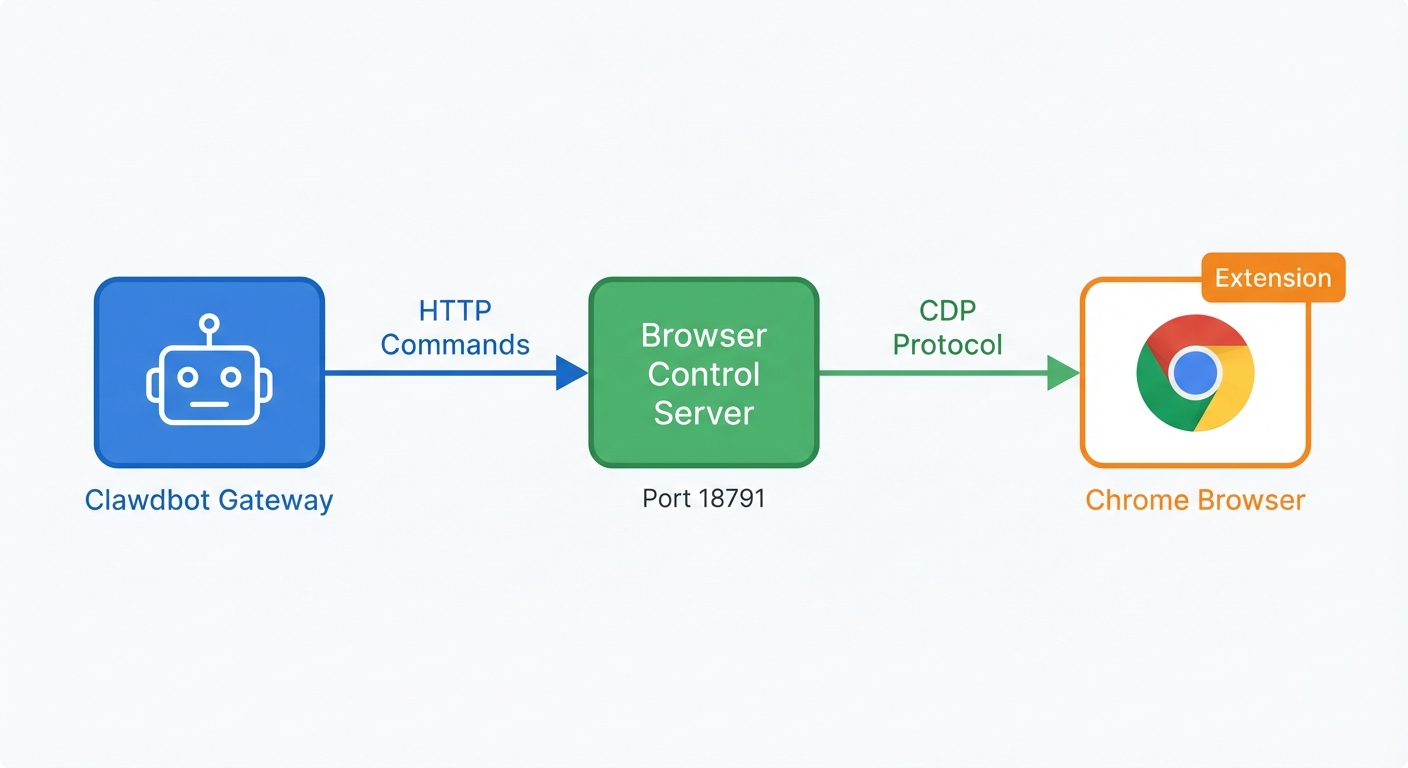
The system has two main components:
-
Browser Control Server (port 18791): An HTTP API that receives commands from the Clawdbot agent. "Click this button." "Navigate to this URL." "Take a screenshot." It connects to Chrome via the Chrome DevTools Protocol (CDP).
-
Chrome Extension: Uses Chrome's
chrome.debuggerAPI to enable CDP access. When you click the extension icon on a tab, it attaches that tab to the relay — giving the control server the ability to drive it.
The control server talks to Chrome via CDP (defaulting to port 18792), which is the same protocol that powers Chrome's developer tools. This is what makes the whole thing possible — CDP provides programmatic access to everything in the browser.
My Setup
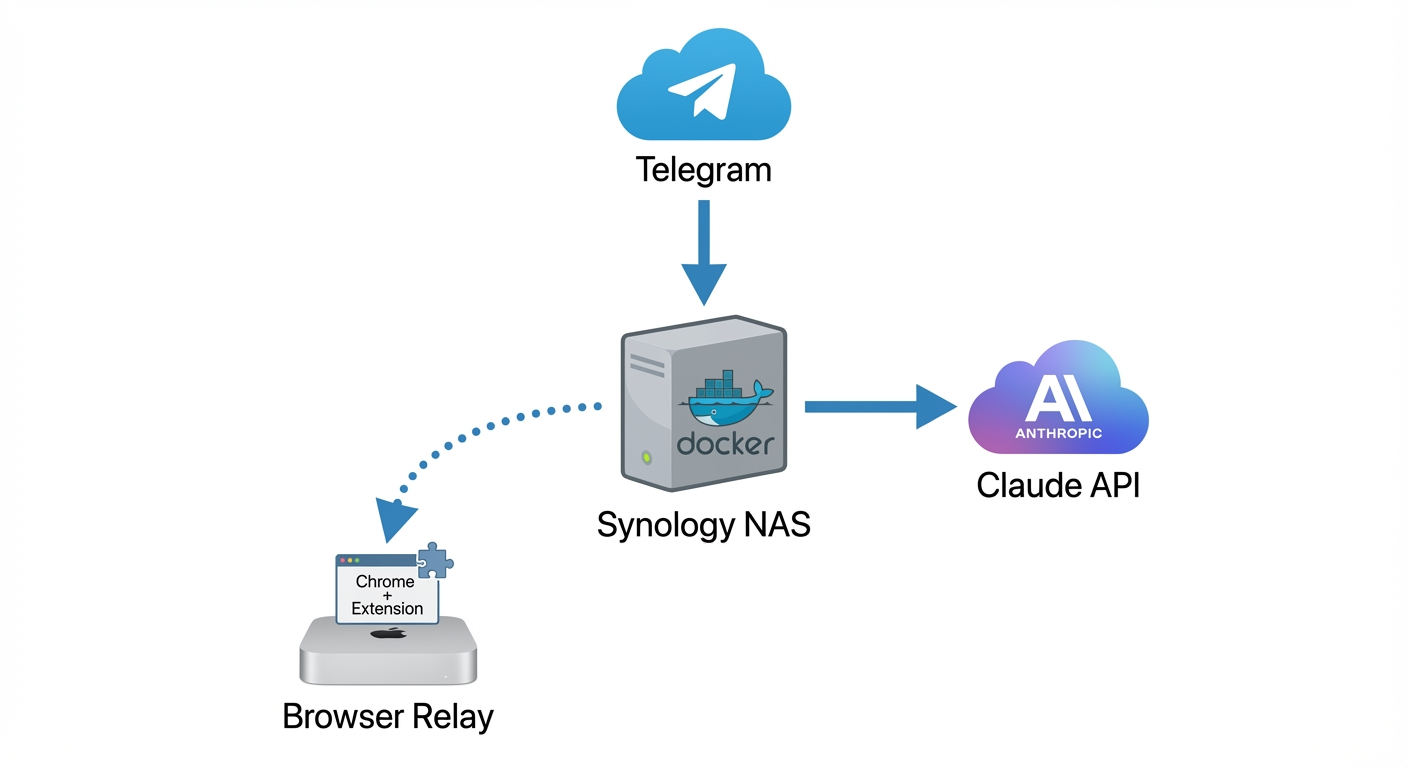
In my case, this is what the flow looks like:
Telegram Message
      ↓
Synology NAS (Docker container running Clawdbot Gateway + Agent)
      ↓
Claude API (Anthropic cloud)
      ↓
When browser access needed...
      ↓
Browser Relay → Mac (Chrome with extension enabled)
The gateway lives on my NAS as a Docker container. The browser runs on my Mac. They talk to each other over my local network (secured via Tailscale). When the agent needs to access something in the browser, it reaches out to my Mac where Chrome is running with the relay extension.
Note: I'm moving to a Mac Mini for the gateway soon — Docker image builds on the NAS take forever. The flexibility of self-hosting means you can evolve your setup over time.
The Manual Attachment Requirement
Here's an important security detail from the Chrome extension docs: the extension doesn't auto-attach to tabs. You have to explicitly click the Clawdbot toolbar icon to attach a tab. The badge shows:
ON— attached and ready…— connecting!— relay unreachable
This is intentional. You're granting the AI access to a specific tab, not handing over your entire browser.
The Magic Moment
The first time I triggered this from Telegram, I won't lie — it felt like magic.
I sent a message: "Sage, go through my X bookmarks and summarize the AI-related ones."
Then I watched my Chrome tab come alive. Navigation happening. Scrolling. The AI reading through my bookmarks, clicking into threads, extracting the content. All while I just... watched.
A few minutes later, a nicely formatted summary landed in my Telegram chat.
No API keys. No rate limits. No authentication dance. Just my AI assistant using my browser like I would.
Now, Let's Put the Security Hat On
Alright, time for the uncomfortable conversation. Because as cool as this is, there's a reason the Clawdbot security guide includes this warning:
"This is powerful and risky. Treat it like giving the model 'hands on your browser'."
Let's break down what you're actually enabling:
What the AI Can Access
When you attach a tab via Browser Relay, the AI can:
- Navigate to any URL in that tab
- Click, type, and interact with any element
- Read all page content (DOM, text)
- Access whatever you're logged into — cookies, session state, everything
- Can run JS predicates/evaluations via the browser tool interface
Read that third-to-last point again. If you're logged into Gmail in that tab, the AI can read and send emails. If you're logged into your bank... you get the picture.
The Attack Surface
| Risk | Level | Details |
|---|---|---|
| Prompt Injection via Page Content | HIGH | A malicious page could inject instructions that manipulate the AI (security guide) |
| Session Access | HIGH | AI inherits all your logged-in sessions in attached tabs |
| Credential Exposure | MEDIUM | If you have a password manager extension, it could potentially be accessed |
| Data Exfiltration | MEDIUM | AI could theoretically send sensitive data to external endpoints |
A Note on Prompt Injection and Modern Models
That said, it's worth noting that state-of-the-art models have gotten significantly better at detecting and resisting prompt injection attempts. Anthropic's Claude Opus 4.5, in particular, has shown strong resistance to adversarial prompts embedded in page content.
This doesn't mean the risk is zero — you should still be cautious about which pages you attach. But I've decided to stick with Opus 4.5 as my inference model specifically because of its robustness against these attacks. The combination of a capable model that can resist manipulation, plus the manual tab attachment requirement, gives me reasonable confidence for my use case.
Your mileage may vary depending on your risk tolerance and what you're accessing.
What This Is NOT
To be clear: Browser Relay is not the same as Clawdbot's managed browser profile (the clawd profile). That one runs in isolation — separate user data directory, no access to your personal sessions.
Browser Relay explicitly uses YOUR browser with YOUR logged-in sessions. That's the whole point — and the whole risk.
The Trust Model: Self-Hosted = You're the Security Team
Here's where it gets philosophical. The entire architecture is self-hosted. My gateway runs on my NAS. The browser relay is on my Mac. All traffic stays on my local network (or Tailscale mesh).
There's no Clawdbot cloud service harvesting my data. No third-party servers in the middle. Browser relay traffic stays local or on your tailnet; outbound calls depend on your enabled providers and tools (LLM APIs, skills registry, etc.).
But here's the tradeoff: you're the security team now.
If you misconfigure something — say, bind the browser control server to 0.0.0.0 instead of loopback — you've just exposed your browser to your entire network. The Clawdbot security docs are explicit about this:
"Never bind to 0.0.0.0. Never use Tailscale Funnel for browser control."
Recommendations from the docs:
- Use a dedicated Chrome profile for the relay (not your daily browser)
- Keep the browser control server on loopback + Tailscale only
- Use separate tokens for browser control vs. gateway auth
- I'm choosing Opus 4.5 for its robustness against prompt injection
Being an early adopter of AI tooling means accepting this responsibility. You don't get a security team vetting your setup. You ARE the security team.
When to Use What
So should you use Browser Relay? It depends on your use case and risk tolerance.
| Approach | Isolation | Capability | Best For |
|---|---|---|---|
| API-based (X API, etc.) | High | Limited to API endpoints | Structured data, high-volume automation |
Managed Browser (clawd profile) | Medium | Full browser, but isolated | Web scraping, tasks not needing personal sessions |
| Browser Relay (Extension) | Low | Full browser + your sessions | Accessing logged-in services, personal automation |
For my bookmark use case, Browser Relay makes sense. I need access to my logged-in X account. An API would require credentials I don't want to manage. The managed browser would require me to log into X separately.
But for web scraping random sites? I'd use the managed browser profile. No need to expose my personal sessions for that.
Conclusion and Final Thoughts
The AI wave is here, and tools like Clawdbot are making it accessible to anyone willing to run their own infrastructure. Browser Relay is one of those capabilities that feels like a glimpse into the future — your AI assistant operating your computer on your behalf.
But with great power comes great responsibility (sorry, had to).
If you're going to use Browser Relay:
- Use a dedicated Chrome profile — not your daily driver
- Keep everything on Tailscale — no public exposure
- Understand what you're enabling — full session access is no joke
- Stay paranoid — prompt injection is a real risk, but modern models help
- Stick with robust models — Opus 4.5 offers good protection against adversarial prompts
The early adopter tax is real. But honestly? Watching my AI scroll through my bookmarks while I sip coffee might just be worth it.
If you're interested in trying Clawdbot, check out the documentation and join the Discord community. And if you have thoughts on the security model, I'd love to hear them — reach out on LinkedIn or X.
Until next time, ciao!