Entry ·
Day in the Life: Building a Prototype with My AI Agent (Without Getting Pwned)

Series: Building with Sage — This is Part 1 of an ongoing series about running a personal AI agent with a security-first mindset. I'll share real workflows, real failures, and the security controls that keep things from going sideways.
Introduction
I asked my AI agent to build me a dashboard. Twenty minutes later, it was live on my network. A friend could pull it up from his laptop.
That sentence should make any security person uncomfortable. It makes me uncomfortable — and I'm the one who built the setup.
Here's the thing: I can't stop using it. The productivity boost is too real. So instead of shutting it down, I've been iteratively hardening the security posture. Defense in depth, sandboxed execution, network controls, manual approval gates — the works.
This post walks through a real session from today: what I asked for, what failed, how the agent pivoted, and the security controls that were quietly doing their job the entire time. Think of it as a "day in the life" of building with an AI agent, told through the lens of someone who spends his day job thinking about application security.
So, let's get started!
The Setup: Meet Sage
Sage is my personal AI agent, running on OpenClaw (formerly Clawdbot) on a Mac Mini in my home office. I talk to it via Telegram and Discord. It manages my todos, tracks my schedule, writes code, runs security audits, and — apparently — builds full-stack prototypes on demand.
I wrote about my initial setup in Introducing Sage: My Personal AI Assistant That Actually Works. Things have evolved since then — Sage now runs on a dedicated Mac Mini instead of my daily driver, with significantly more security controls. This post covers the current architecture.
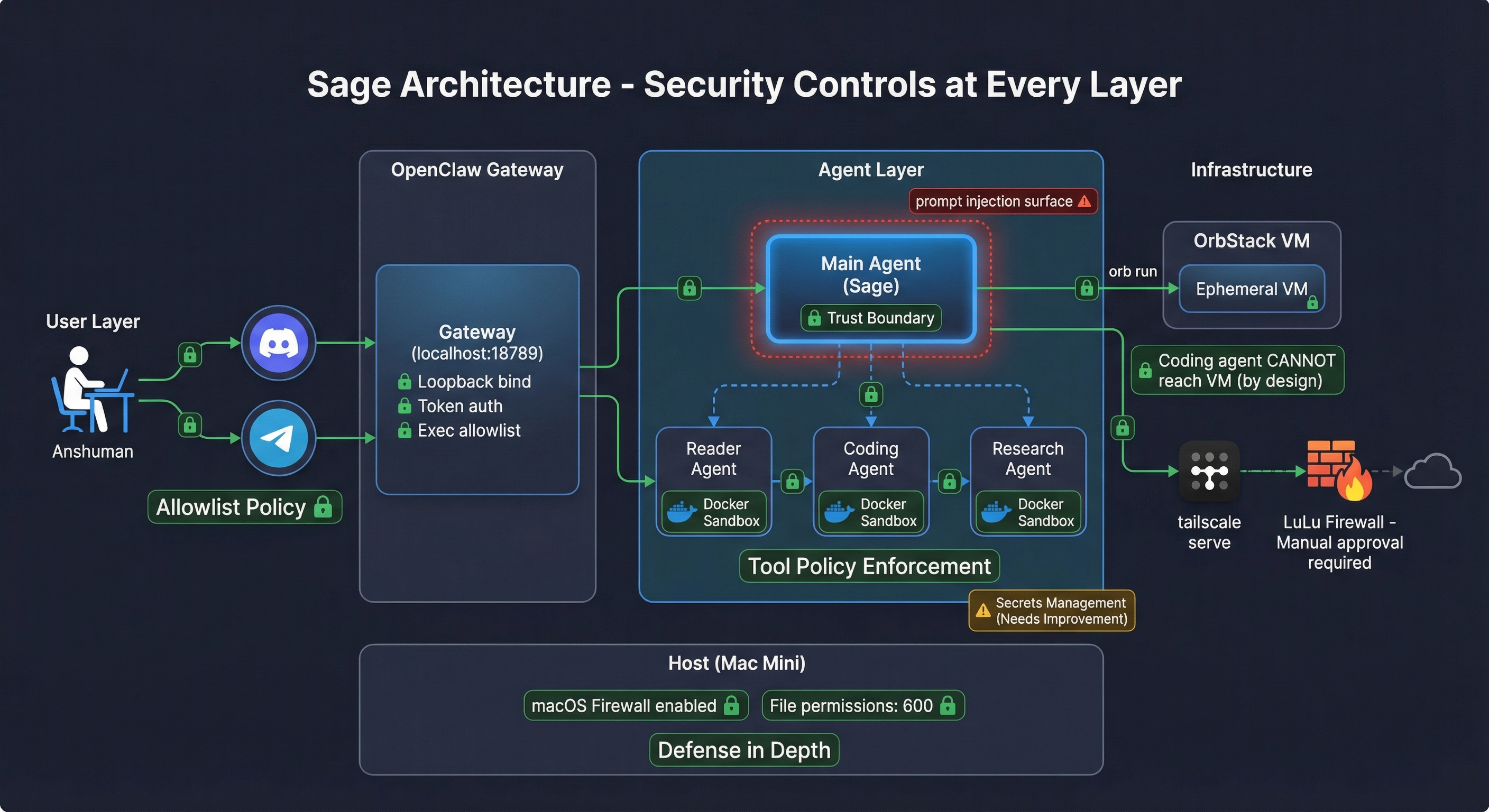
Here's the architecture at a high level:
User → Messaging (Discord/Telegram) → OpenClaw Gateway → Main Agent (Sage) → Subagents/VMs/Tools
The key design principle: Sage is the trust boundary. Anything that could contain attacker-controlled content gets delegated to a sandboxed subagent. The main agent stays clean.
Let me break down the security controls at each layer:
- Messaging Layer: Both Discord and Telegram use
allowlistgroup policies. Only I can talk to Sage. No public access, no email hooks (that's a whole other attack surface). - Gateway: Binds to
loopbackonly — not reachable from the network. Token auth. Exec security set toallowlist. - Main Agent: Runs unsandboxed on the host (yes, this keeps me up at night — more on that later). Has access to host tools, file system, and my messaging channels.
- Subagents: Reader Agent, Coding Agent, Research Agent — each runs in a Docker sandbox with explicit tool allow/deny lists. The Coding Agent can
execandwritebut can'tmessage,gateway, orcron. By design. - Host: macOS firewall enabled. Sensitive files (
openclaw.json, identity keys) locked to600permissions. Daily automated security audits. LuLu firewall for inbound and outbound connection control.
The Ask
A friend of mine runs an online business. He's got VAs (virtual assistants) managing different departments — email support, order fulfillment, social media responses. They report to him, but he knows the reporting is inconsistent.
He asked me: "Can AI give me better reporting and oversight than my VAs self-reporting?"
I told Sage: build me a business operations dashboard prototype. Three panels — email ops, order fulfillment, Facebook comments — with an AI morning briefing at the top. Dark theme, modern SaaS look, mock data that tells a story. Something I can screenshot and send to my friend in under an hour.
The Build: What Actually Happened
This is where it gets interesting — and where the security controls actually did their job.
Step 1: Sage Writes a Spec
First thing Sage did was write a detailed spec to projects/consulting/biz-dashboard/SPEC.md. Stack choice (Next.js 14, Tailwind, Recharts), component breakdown, mock data structure, design requirements. Good practice — document before you build.
💡 Security Improvement Idea: Security-by-Default Specs
What if the spec-writing step automatically included security requirements? Imagine a set of rules in the agent's config that inject security defaults into every project spec — things like:
- Auth required — no unauthenticated endpoints by default
- No secrets in code — API keys via environment variables only
- HTTPS only — no plaintext HTTP in production
- Input validation — sanitize all user inputs
- Dependency audit — run
npm auditbefore first commit - CORS policy — restrictive by default, explicitly opened
This could be a section in AGENTS.md or a dedicated security-defaults.md that the agent reads whenever it writes a spec. The prototype today didn't need most of these (mock data, no auth, no real APIs), but for production builds this would catch security gaps before a single line of code is written. Shift left, but automated.
Step 2: Coding Agent Fails (And That's a Good Thing)
Sage's default behavior for code scaffolding is to delegate to the Coding Agent — a sandboxed subagent that runs in Docker. This is the secure path: the Coding Agent has restricted tool access and can't touch the host system.
But I had asked Sage to build inside an OrbStack VM (my preferred way to spin up ephemeral Linux environments). Here's what happened:
❌ Coding Agent: "I can't complete this task from the sandbox environment."
   - Can't read the spec file (outside sandbox mount)
   - Can't run `orb` commands (host-only tool)
This is the sandbox working correctly. The Coding Agent runs in Docker with tool policy enforcement. It can't reach the host filesystem, can't run host CLI tools, can't escape its container. The fact that it failed is a security win — it means the isolation is real.
The tradeoff is clear:
- Docker sandbox = weak filesystem isolation, strong tool policy enforcement
- OrbStack VM = strong filesystem isolation, no tool policy enforcement
Tool restrictions matter more than filesystem isolation. A sandboxed agent that can't call gateway or message is safer than a VM-jailed agent with full shell access.
💡 Security Improvement Idea: VM-Aware Sandboxing
The coding agent failed because Docker sandbox can't reach OrbStack VMs. That's correct behavior — but it means VM-targeted work falls back to the unsandboxed main agent. The ideal would be:
- Per-agent exec routing — route a sandboxed agent's commands to a specific VM instead of Docker
- Tool policy enforcement inside VMs — the agent runs in the VM but still can't call
gateway,message, orcron - Ephemeral VM sandboxes — spin up a VM per subagent session, destroy on completion
This would give you strong filesystem isolation (VM) AND strong tool policy enforcement (sandbox rules). Right now you get one or the other. I've filed this as a feature request with the OpenClaw project — if this resonates with you, give it an upvote!
Step 3: Sage Pivots — Builds It Directly
Since the Coding Agent couldn't bridge into the VM, Sage built the dashboard directly. As the main agent, it has host access and can run orb commands.
# Spin up ephemeral VM (~30 seconds)
./assets/scripts/create-dev-vm.sh biz-dashboard

# Scaffold Next.js project inside VM
orb run -m biz-dashboard bash -c 'npx create-next-app@14 biz-dashboard ...'

# Install deps
orb run -m biz-dashboard bash -c 'cd ~/biz-dashboard && npm install recharts lucide-react ...'
Note: In the actual session, Sage ran these as root (
-u root). That's a bad habit — even in an ephemeral VM, principle of least privilege applies. The dev VM script now creates a non-root user by default. One of those "it's just a demo" shortcuts that shouldn't become muscle memory.
Sage wrote all the source files (mock data, components, pages) to the host workspace, then copied them into the VM via OrbStack's filesystem mount. Started the dev server bound to 0.0.0.0:3001.
Result: a fully functional dashboard with three department panels, trend charts, status indicators, and an AI morning briefing card — running inside an ephemeral VM.
💡 Security Improvement Idea: Least Privilege in Ephemeral VMs
Even throwaway VMs should follow least privilege:
- Non-root by default — the dev VM script should create and use a dedicated user, only escalating to root for package installation
- No sudo without logging — if root is needed, log every
sudoinvocation to the audit trail - Read-only host mounts — OrbStack mounts the host home directory into the VM by default. This should be read-only or disabled entirely for untrusted workloads
- Network restrictions — ephemeral VMs should have outbound-only access scoped to what they need (npm registry, GitHub), not full internet access
The mindset: treat every VM like it could be compromised, even if you just created it 30 seconds ago.
Step 4: Exposing the Dashboard (And LuLu Says No)
I was on my MacBook, not the Mac Mini. So I needed remote access to the dashboard running in the VM.
Sage set up a Python TCP proxy on the Mac Mini (port 3333 → VM port 3001) and tried to expose it via the Tailscale IP. I hit the URL and... nothing.
LuLu was blocking incoming connections on the Tailscale interface.
This is exactly what defense in depth looks like in practice. Even though:
- The VM was on a private OrbStack network
- Tailscale provides encrypted mesh networking
- The Mac Mini has macOS firewall enabled
...there was still another layer — LuLu — requiring manual approval for any new network connection. I had to physically log into the Mac Mini and allow the incoming connection.
Sage then set up Tailscale Serve to proxy https://<redacted>.ts.net → localhost → VM. Once I allowed the connection, the dashboard was accessible from my MacBook over an encrypted Tailscale tunnel.
The fact that I had to manually intervene is the point. Automated convenience is great until it's an attacker automating the convenience. Manual gates at critical junctures are worth the friction.
💡 Security Improvement Idea: Network Exposure & Agent-Aware Firewalls
The network exposure problem: The agent was able to set up a TCP proxy and Tailscale Serve without asking me first. That's convenient — but it means the agent can autonomously expose services to the network. LuLu caught it at the firewall level, but what if it hadn't been installed?
A better approach:
- Network exposure as a privileged action — require explicit user approval before binding to non-loopback interfaces, setting up proxies, or enabling Tailscale Serve
- Exposure audit log — every time the agent opens a port or creates a proxy, log it to a security audit trail with timestamp, port, destination, and reason
- Auto-teardown timers — any exposed service auto-shuts down after N minutes unless explicitly extended. No forgotten demo servers running for weeks.
- Tailscale ACLs — use Tailscale's ACL policies to restrict which devices can reach specific ports, rather than relying solely on LuLu
The layered defense (Tailscale + LuLu + macOS firewall) worked today, but it was luck-of-the-stack, not policy-enforced.
Taking it further — agent-aware firewalls: LuLu blocked the incoming connection, which is great. But LuLu doesn't know why the connection was being made — it just sees a process trying to listen on a port. Imagine if:
- LuLu rules could be agent-aware — "allow connections initiated by user action, block connections initiated autonomously by agents"
- OpenClaw could integrate with LuLu's API — the agent requests network access, LuLu prompts the user with context ("Sage wants to expose port 3333 to your tailnet for a dashboard demo. Allow?")
- Firewall rules as part of the agent's tool policy — just like exec has an allowlist, network exposure could have one too
This turns the firewall from a blunt "allow/deny per app" into a context-aware security control that understands the agent's intent.
The Dashboard
Here's what the final prototype looked like:
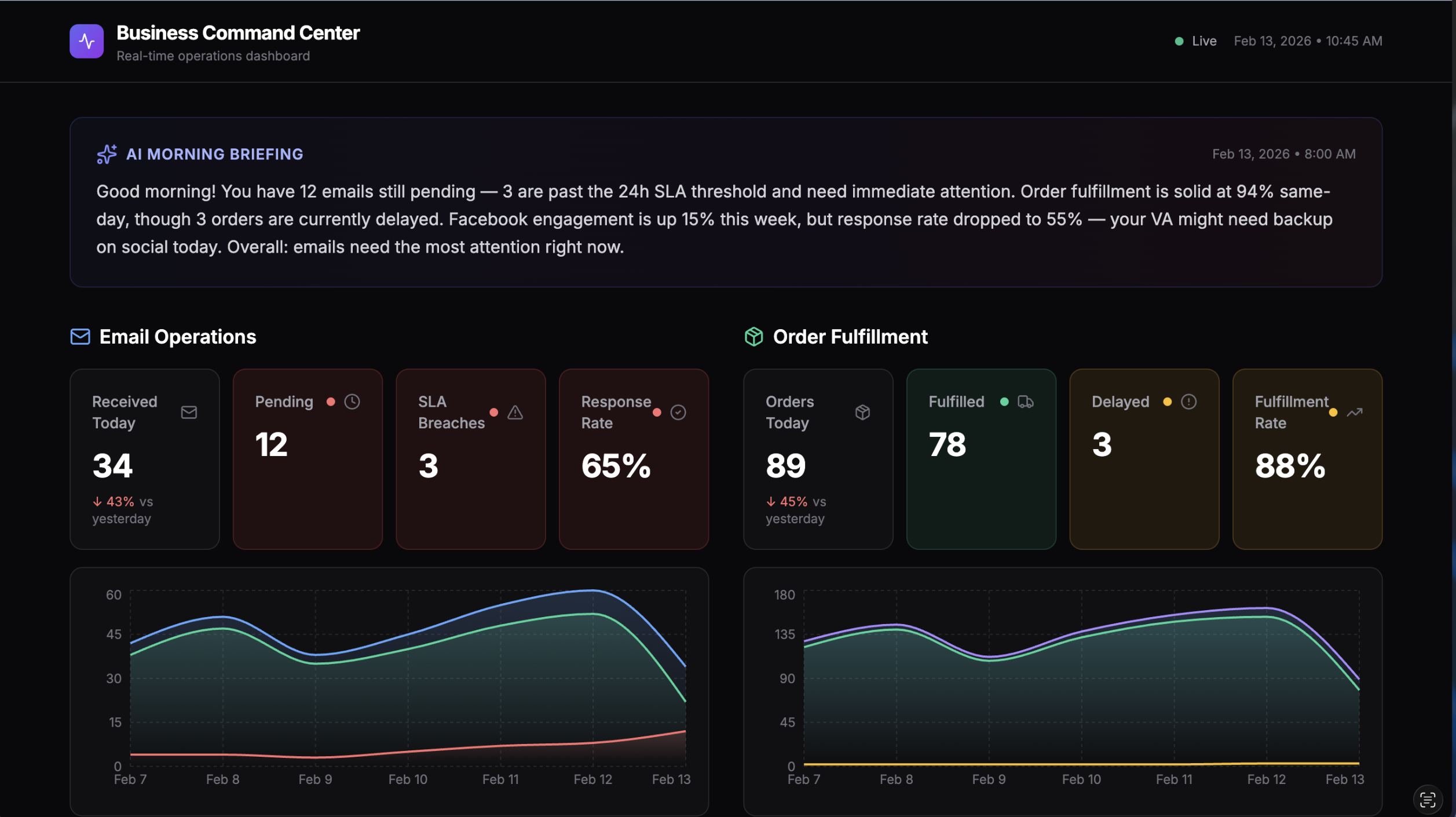
Three panels monitoring email operations, order fulfillment, and Facebook social media responses. Each panel has stat cards with red/yellow/green status indicators, 7-day trend charts, and key metrics. The AI morning briefing at the top summarizes what needs attention in plain English.
All mock data — but realistic enough to demonstrate the concept. Total time from request to live dashboard: ~20 minutes.
What's Working: Security Wins
Let me highlight the controls that actually did their job today:
1. Docker Sandbox Caught a Boundary Violation The Coding Agent couldn't escape its container to reach the VM. This wasn't a bug — it was the sandbox working as designed. Tool policy enforcement prevented the subagent from accessing host infrastructure.
2. LuLu as Defense in Depth Even with Tailscale and macOS firewall, LuLu added another layer that required manual approval. An agent autonomously exposing a service to the network got stopped by a human-in-the-loop control.
3. Ephemeral VMs
The dashboard VM existed for exactly as long as needed. When we were done, orb delete biz-dashboard — gone. No persistent attack surface from demo infrastructure sitting around.
4. Tailscale as Network Boundary The dashboard was never on the public internet. Tailscale's encrypted mesh meant only my devices on my tailnet could reach it. No port forwarding, no public IPs.
5. Allowlist Policies Everywhere
Telegram and Discord both use allowlist group policies. Exec security is set to allowlist. Only explicitly approved channels and commands work.
6. Daily Automated Audits Every morning at 8am, Sage runs a security audit — checks firewall state, file permissions, gateway config, world-readable files, and LuLu rule changes. Any anomaly triggers an immediate Telegram alert. Today's audit: all clear.
What Keeps Me Up at Night: Security Gaps
I'm not going to pretend this setup is bulletproof. Here's what worries me:
1. Secrets Management
Right now, API keys sit in openclaw.json with 600 permissions. That's... fine? But not great. If the main agent gets prompt-injected into running a cat on that file, those keys are gone.
I'm currently exploring nono.sh — a kernel-level sandbox that could provide just-in-time secrets injection. The idea: secrets never touch the filesystem. They're injected into the process environment at runtime and the sandbox prevents exfiltration. Still experimenting. If you've got other approaches to agent secrets management, I'd love to hear them.
2. Main Agent Runs Unsandboxed This is the big one. Sage (the main agent) runs directly on the Mac Mini with full host access. The subagents are sandboxed, but the main agent is the trust boundary itself — and it's not sandboxed.
Why? Because the main agent needs to run orb commands, manage crons, send messages, read the filesystem. Sandboxing it would break most of its functionality. The mitigation is limiting what reaches the main agent: no email hooks, no web browsing, no processing untrusted content directly. All external content goes through sandboxed subagents first.
But if someone finds a way to inject through my Telegram or Discord messages... yeah. That's the threat model gap.
3. Prompt Injection Surface
Every time the AI reads external content (URLs, emails, Facebook comments for the dashboard), there's a prompt injection risk. The subagent architecture helps — the Reader Agent processes untrusted content in a Docker sandbox with no access to message, gateway, or cron. But the summarized output still flows back to the main agent.
A sophisticated enough injection could potentially survive the summarization step. I don't have a great answer for this yet beyond "don't let the main agent act on summarized content without human review."
4. The OrbStack Filesystem Mount OrbStack mounts the host home directory into VMs by default. That means a process inside the VM could potentially read host files through the mount. For ephemeral demo VMs this is acceptable risk, but for untrusted workloads I'd need to configure mount restrictions.
Lessons and Takeaways
1. Iterative hardening beats analysis paralysis. I could have spent months designing the perfect secure agent architecture before using it. Instead, I started using it and hardened as I went. Each incident or near-miss becomes a new control. The security posture today is dramatically better than day one.
2. Defense in depth actually works. LuLu catching the network exposure wasn't planned for that specific scenario. But stacking controls — firewall + LuLu + Tailscale + manual approval — meant that even when one layer was permissive, another caught it.
3. Tool policy > filesystem isolation. The Coding Agent failing to reach the VM was a better security outcome than if it had succeeded. Preventing an agent from calling gateway restart or message send matters more than what files it can see.
4. Ephemeral infrastructure is underrated. Spin up a VM, do the work, tear it down. No lingering attack surface, no config drift, no "I forgot that demo server was still running." Make infrastructure disposable by default.
5. Human-in-the-loop gates are features, not bugs. The LuLu approval prompt felt like friction in the moment. In retrospect, it's exactly the kind of control that prevents autonomous agents from silently expanding their network access.
I'm genuinely interested in community feedback on this setup. What am I missing? What would you harden differently? What's the threat model gap I'm not seeing?
Feel free to reach out to me with any comments/feedback:
- LinkedIn: @anshumanbhartiya
- GitHub: anshumanbh
- Blog: anshuman.ai
Until next time, ciao! 🦉